Overview
Danis is a third-generation construction firm, building since 1916 across the Midwest and Southeast. In late 2025 they asked for a resource planning application. They already had Procore, but people found it too complex and used it mainly to check a box. It let them schedule conflicts because it wasn't clear who was really available, and finding people across projects was hard. (Whether Procore couldn't do these things or nobody had been shown how, the result was the same.) Project schedules lived in Oracle Primavera P6, and people records lived in SharePoint. CoStrategix won the work, and I was the product designer from the first discovery session through user acceptance testing.
The RFP asked for four things: easier requests and assignments, better forecasting, visible utilization, and a working product by October. Behind those asks were three jobs. Workforce managers allocate people across projects. Project managers staff their projects with the right trades. Executives need to see all of it at the business level. The goal was to replace the spreadsheet process with one that's faster and more flexible for each of them:
- Project managers request people faster, and many at once.
- Workforce managers see who's available and fill requests sooner.
- Executives see the numbers that matter without waiting on a report.
Underneath is a simple model. A project has a labor plan in phases. Each phase holds requests, like "three drywallers, four weeks from now, 8h a day." A request is a bundle of slots, and a slot is what one worker fills. Everything that matters happens where a slot meets a worker: is it filled, is it double-booked, does the person have the certification.
Discovery
Four discovery tracks in February, one for each group that would use the product.
We ran walkthroughs over Microsoft Teams with two or three people from each group, as many as time and budget allowed, and had each person show us how they actually did their work. Then we sorted what we saw into themes that carried through the rest of the project. Same data, four very different days.
The workforce manager
Allocates people across projects and fills open requests all day. The person the product was first built for. "WFMs are going to be so wide. It's finding the needles in the haystack."
The project manager
Staffs the project with the right trades. Wants to know who is on the job, when they leave, and where their call ends and the workforce manager's begins.
The executive
Needs the whole business in one view: regional coverage, forecasting they can trust, and a queue of what's waiting on them.
The field
On site, gloves on. Needs to know the person at the gate belongs there, without a laptop.
Insights
Nobody could see the labor they had against the labor projects needed, and the four groups didn't share the words to talk about it.
The ask was "better visibility," but that's a symptom. So instead of adding reports on top of Procore and the spreadsheets, we designed a system for running the workforce, and wrote the problem as one question:
How can we make requesting and allocating people more efficient, transparent and configurable?
Each word lines up with a role:
Efficient, for project managers
They couldn't request several electricians at once, so they set up one request and repeated it for each person. The rest moved by phone and email: three drywallers in four weeks was a phone call, with no record.
Transparent, for workforce managers
Each had their own way of allocating, like a color-coded Excel system, and some filled big jobs crew by crew to keep the same people together. Same task, different methods, and nobody else could see inside them.
Configurable, for executives
They pulled their own reports, nothing was standardized, and they wanted to save their reports and setups.
One problem with three symptoms. Solving the root problem takes care of the symptoms downstream. And plans change constantly: delays, client changes, contract adjustments. A tool that assumes a stable plan is wrong on day one, and the old one did.
Operations said trade, the field said category, HR said role, and the ERP said a code like JW or AP, so no two reports agreed. That vocabulary gap became part of the product. We ran a terminology mapping exercise: asked each group what they called things, compared the current terms (as-is) with what everyone could understand (to-be), and settled on a shared taxonomy. Drywall became a category with subcategories (ACT, finishers, hangers, framing), so it means the same thing on every floor.
Because the product would be white-labeled for other companies, the taxonomy had to be configurable. I designed a resource definitions area in the admin console: the system keeps a fixed meaning for each term, and an administrator sets the label their company uses for it.
Design decisions
Design the system before the screens, so seven areas feel like one product.
Seven areas, four groups of users, and a build partly written by agents. That only stays consistent if the system comes first: one set of tokens, one component set, and one rule for each decision that keeps coming up.
One palette, ready to re-skin
Every color is a variable in one collection, never a value typed into a screen. That's why the later rebrand was a token swap instead of a redesign.
One component set
Built on shadcn, cut back to what the tasks needed, and extended with what this product needs: status chip, filter chip, worker row, gantt bar, side rail. Every slide-out is the same sheet, same width, same anatomy.
One grid
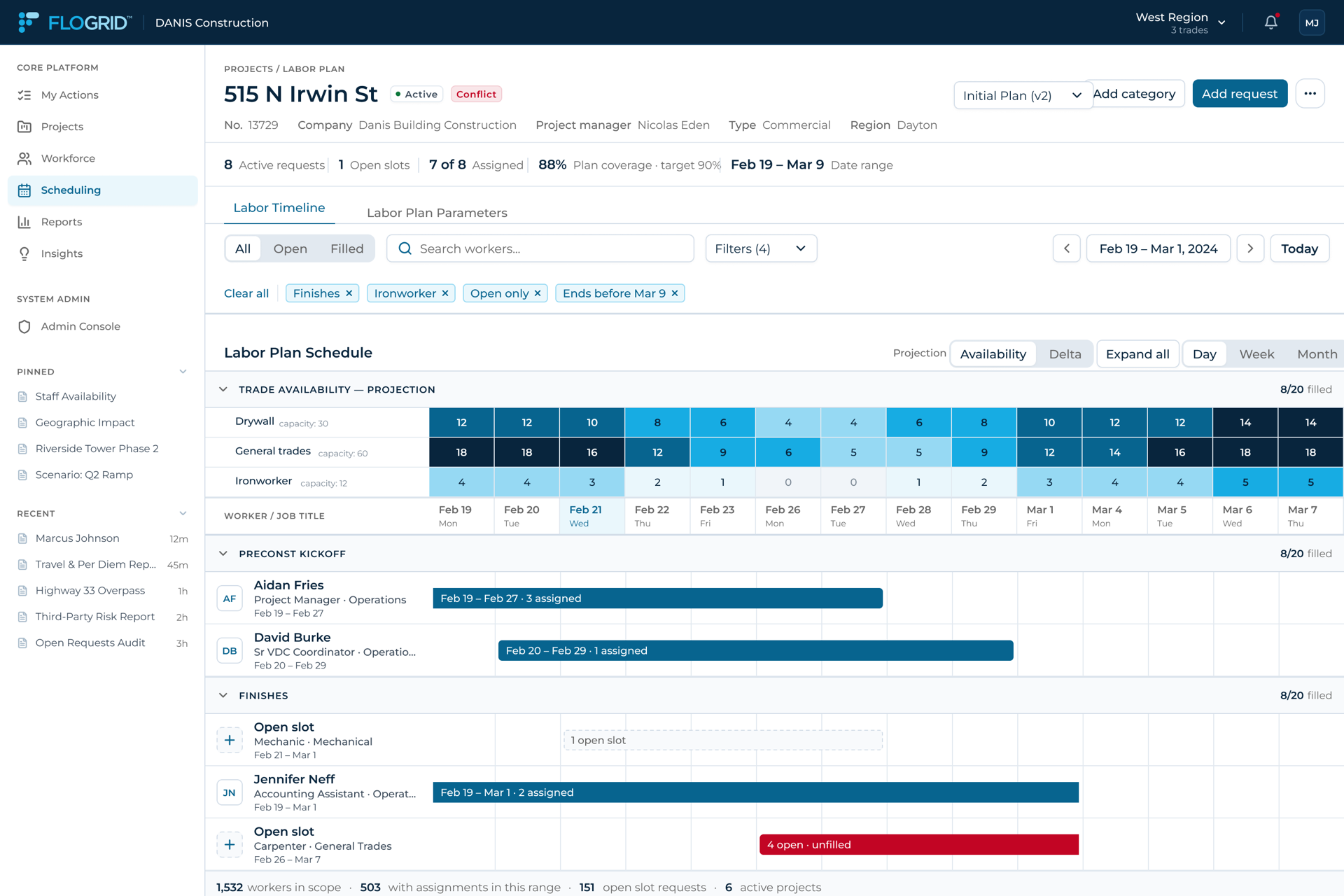
The gantt on Projects is the gantt on Scheduling: same date header, same bar, same today marker. A project manager and a workforce manager get different answers from the same tool.
One rule for color
Green, amber and red mean status and nothing else. Availability and regional activity use a single blue ramp, so a page full of open slots doesn't turn into a wall of yellow.
One rule for structure
If something is the same for everything in a section, it belongs in the section header. Ironworkers (3) as a band, then the three ironworkers under it.
One voice
Plain words instead of inherited codes, and the same label for the same thing on every screen. The resource definitions work made that enforceable.
Every color has a name that says its job, and the same names carry into the DESIGN.md and the code. Type is Montserrat, moved to with the FloGrid rebrand, in nine styles from type/page (24px) down to type/micro (9px).
Status · green, amber and red mean status, nothing else
status/#0D773Bgreen status/#E7F1EBgreenBg status/#A15012amber status/#F6EEE7amberBg status/#C20524red status/#F9E6E9redBg
Ramp · the one sequential scale
ramp/#EAF7FD1 ramp/#96D9F32 ramp/#17ACE33 ramp/#07648F4 ramp/#08253D5
Text
text/#08253Dprimary text/#3B4A5Asecondary text/#666666meta text/#07648Fbrand
Surface and border
surface/#F8FAFCsubtle surface/#EAF7FDselected surface/#08253Dsidebar border/#D3DDE8default border/#96D9F3brandSubtle
Each of these traces back to something we found:
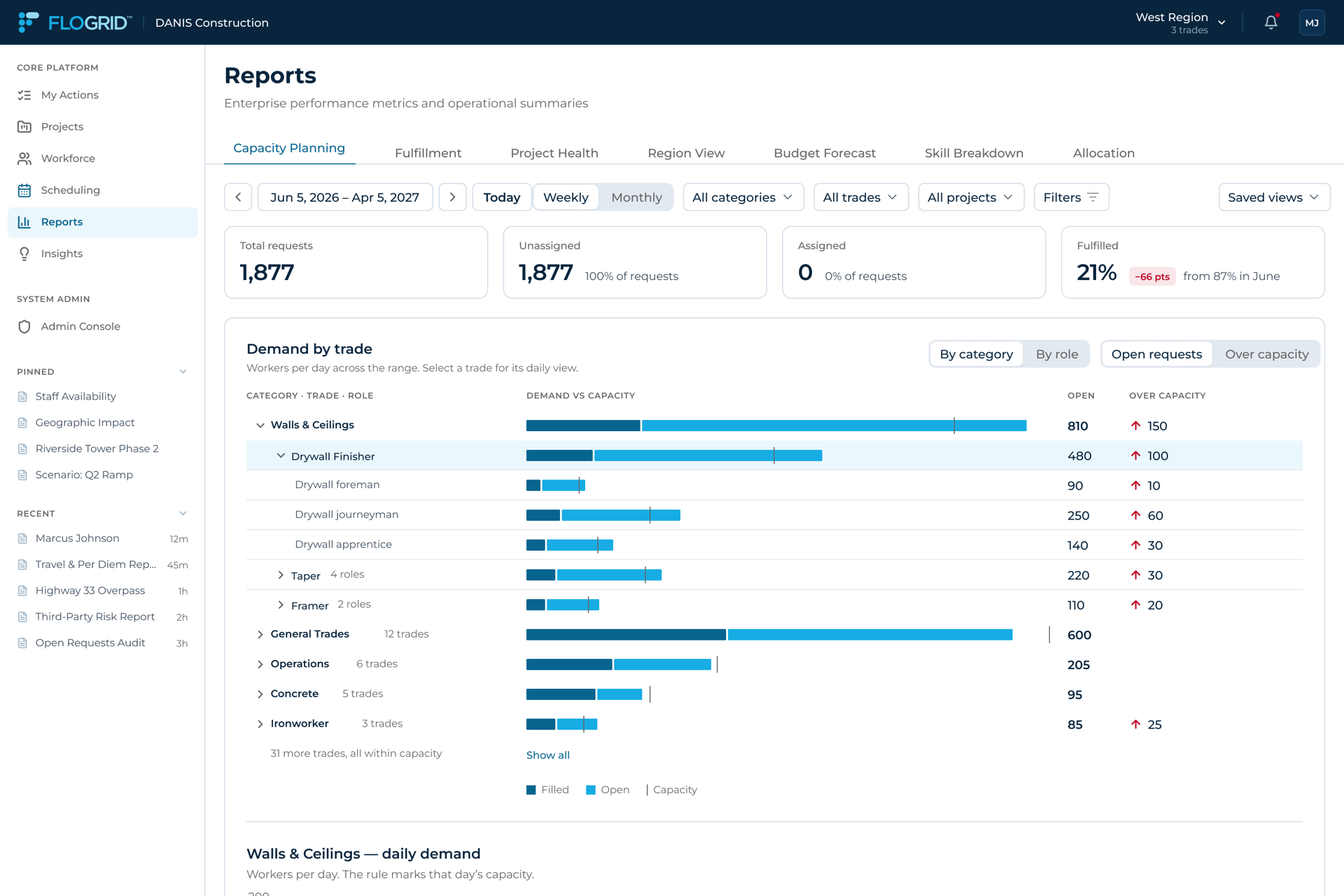
Finding: Nobody could see which trades were short without pulling it together by hand.
Design: Requests sit above workers on every board, so the page answers what's unfilled before who's busy.
Finding: Project managers repeated one request per person, and workforce managers wanted to fill a job with a whole crew.
Design: Requesting and assigning both work in bulk, so a crew stays together.
Finding: Even one role works many ways. Some filled jobs crew by crew, and one ran his own spreadsheet process.
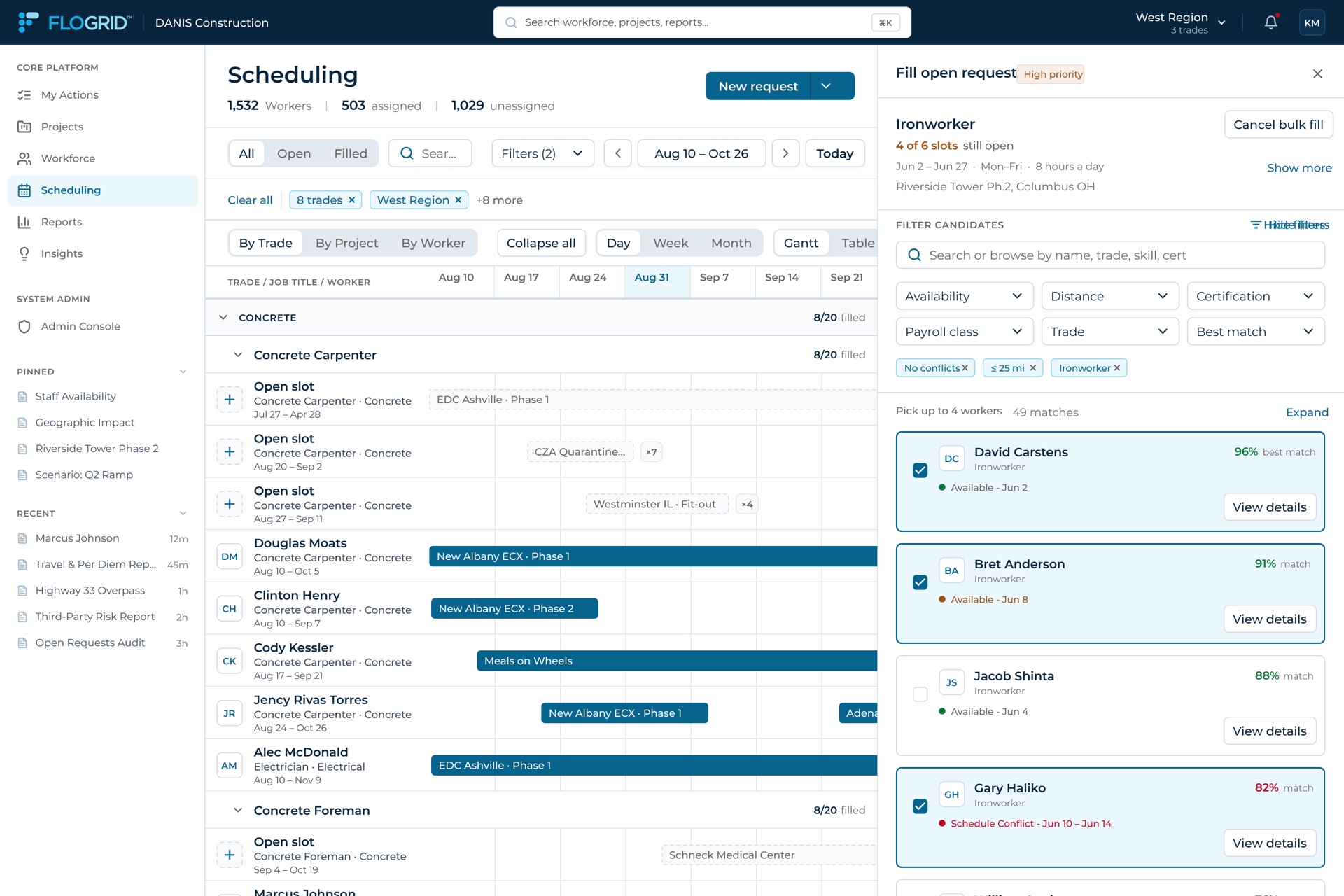
Design: One gantt with many views: by project, by trade, by worker, and later by requested role.
Finding: An executive's morning looks nothing like a workforce manager's.
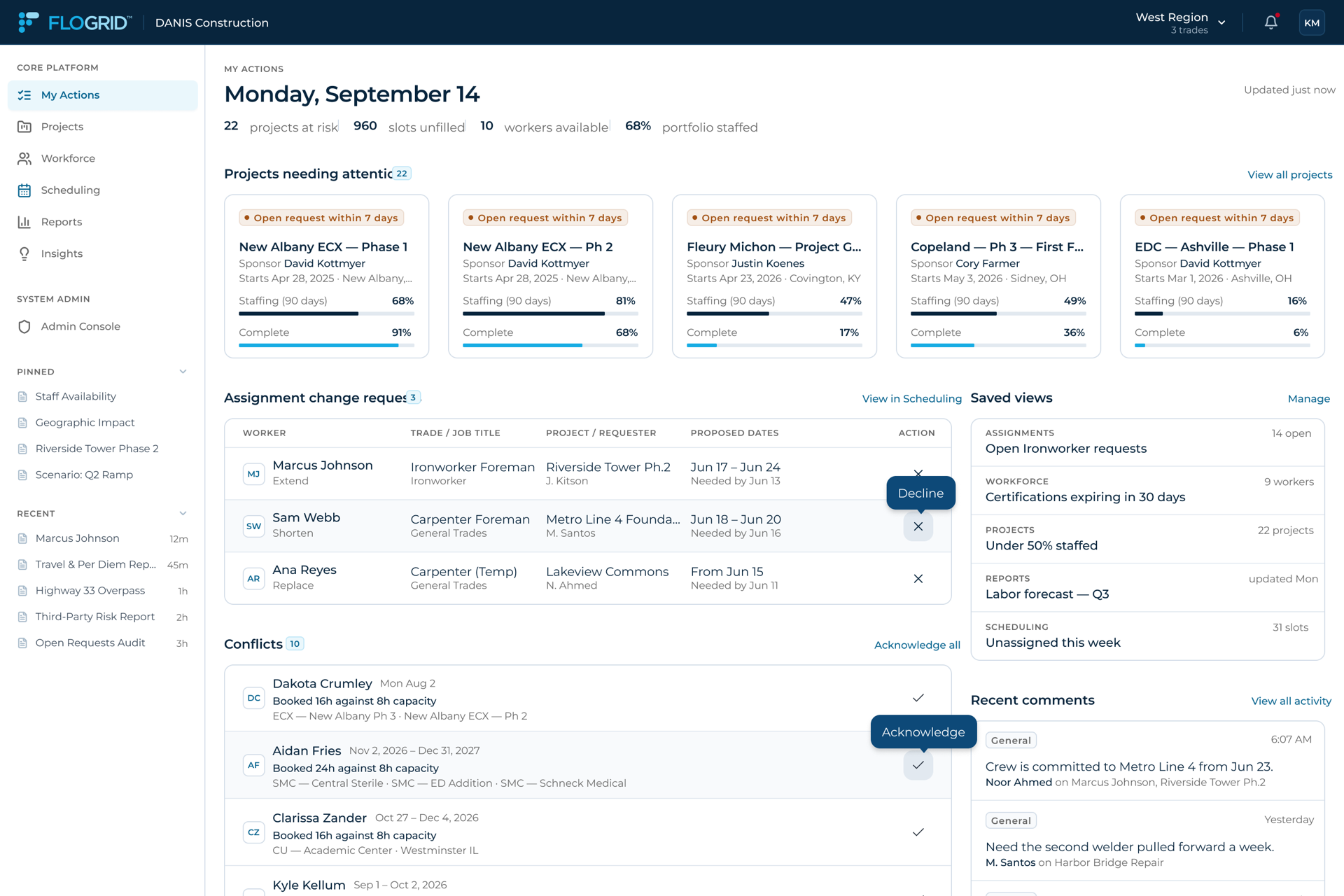
Design: Operations and analysis on separate screens. My Actions, the landing page, became two.
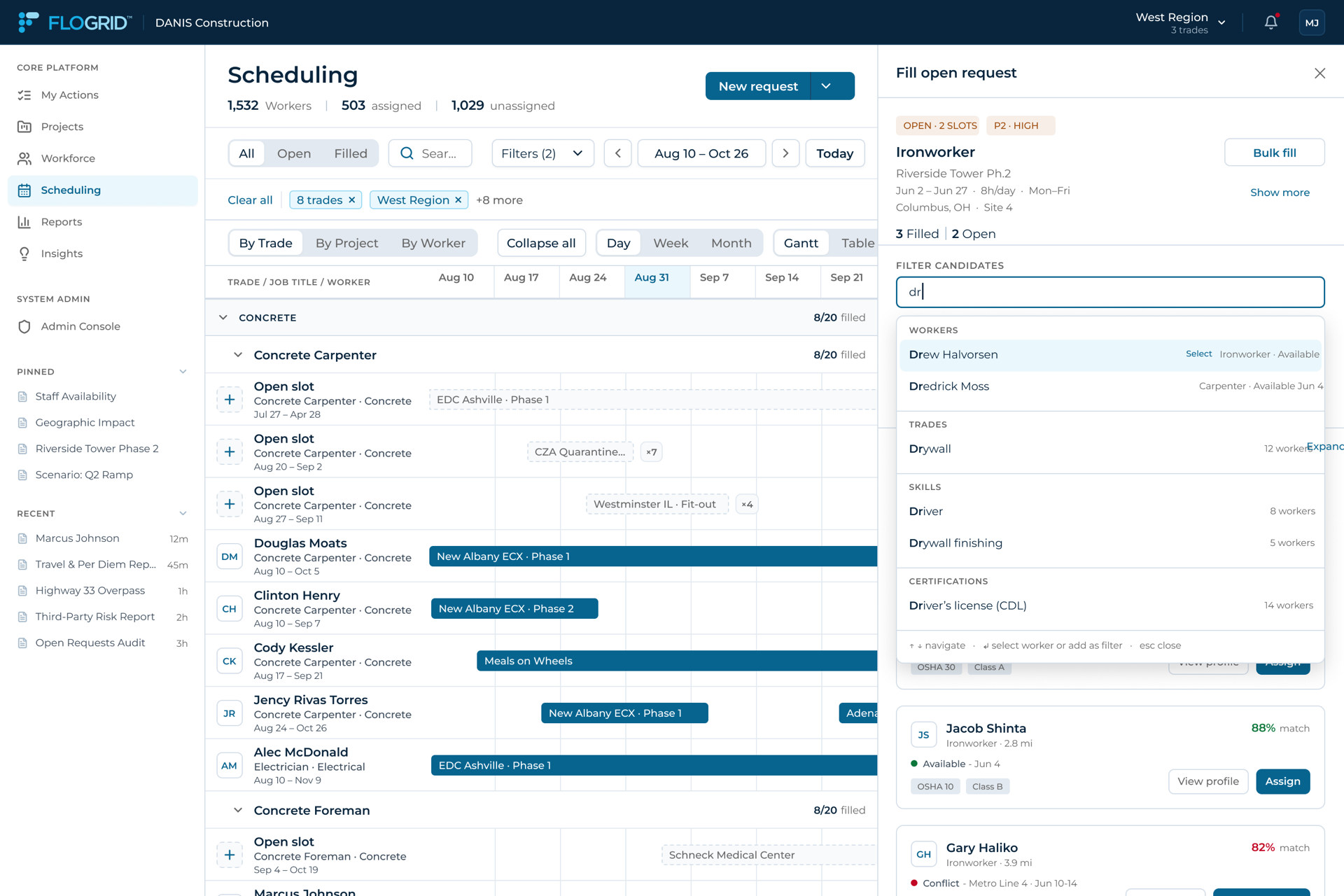
Choose a worker
Compare qualifications and availability before assigning.
Labor plan categories
Hover a row to rename, add, reorder or remove it.
- Finishes9/10 filled
- Rough-in / MEP6/8 filled
- Concrete4/4 filled
Building it this way made the next step possible. When the product was set up to stand on its own, I took the identity the rest of the way: the name, the mark, the palette, the type, and chart colors that keep status separate from everything else. FloGrid is the product now, and Danis is its first client.
Solution
Seven product areas, each built for one group's job.

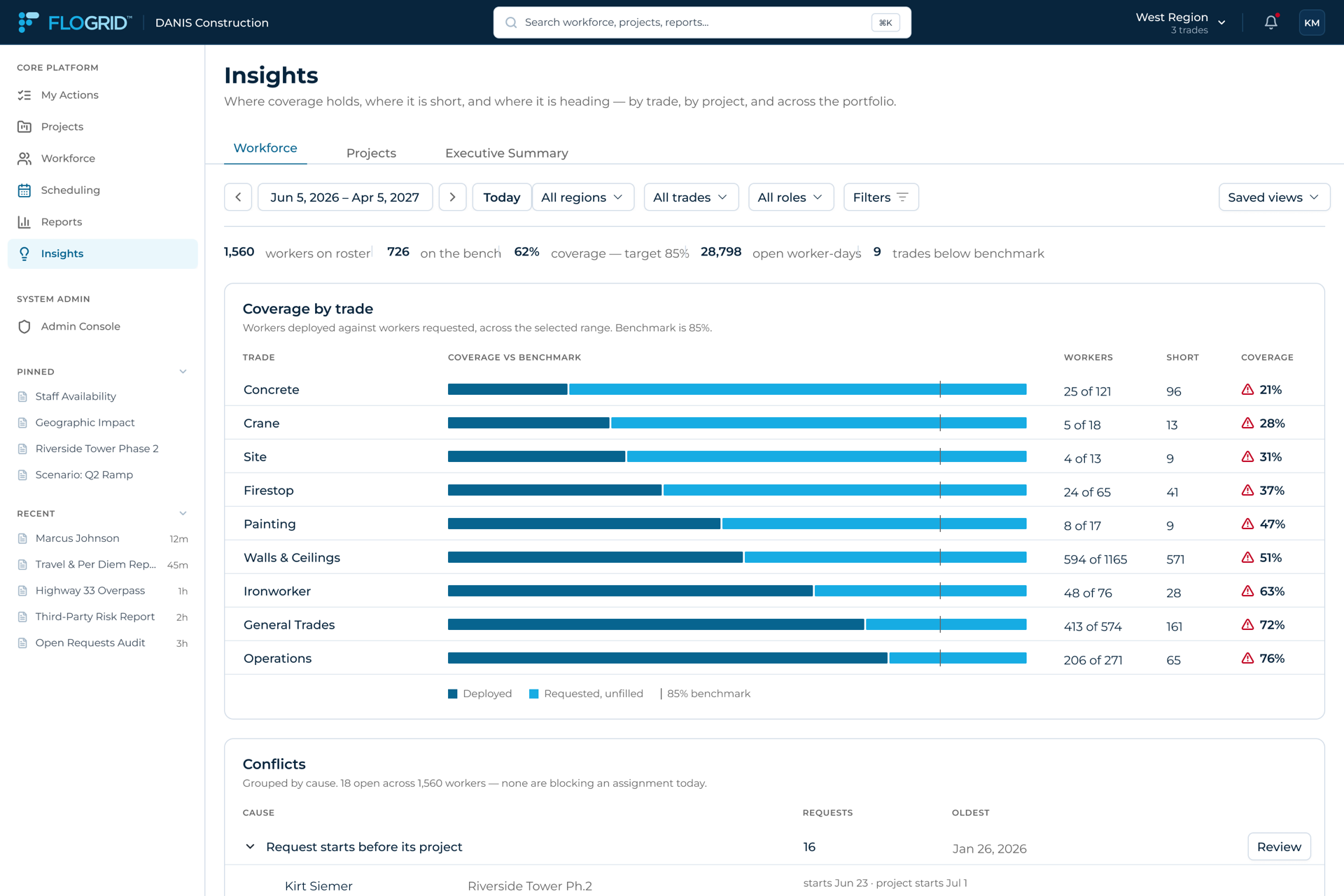
Three more areas round it out:
Requests
Submit and track labor requests by project, trade, skills and timeline, with approval and change flows when plans slip.
Workforce
A directory and profiles with a by-day availability calendar that shares the gantt's date header.
Admin console
Resource definitions: trades, categories, roles with their ERP codes, and the label each company uses for each one.
Try the prototype
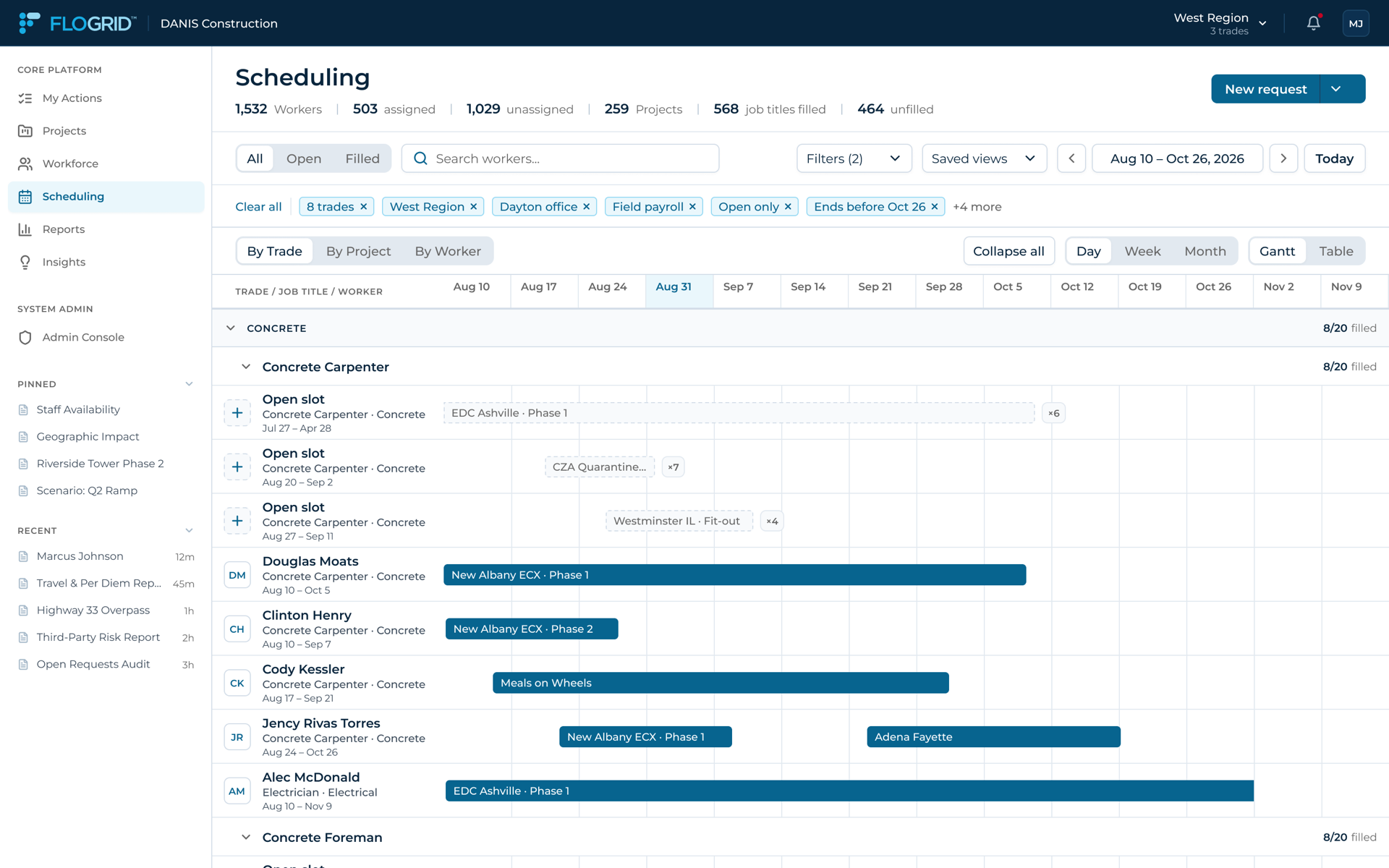
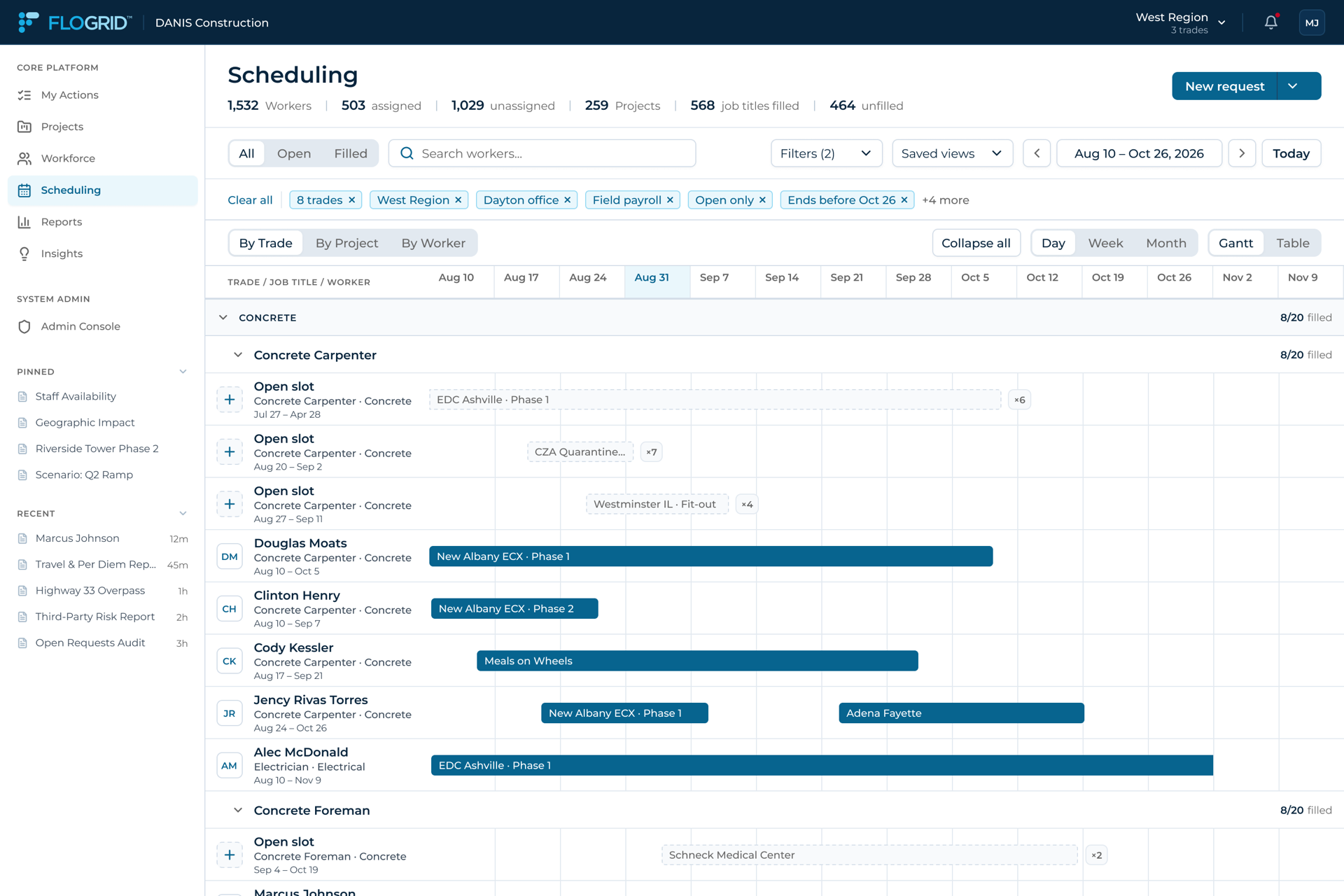
Press + on any open slot to open the request, see ranked candidates with their availability and match, and assign one. Assigning a candidate with a conflict shows the conflict state, and Undo puts it back. The data is made up, and it's built on the FloGrid tokens.
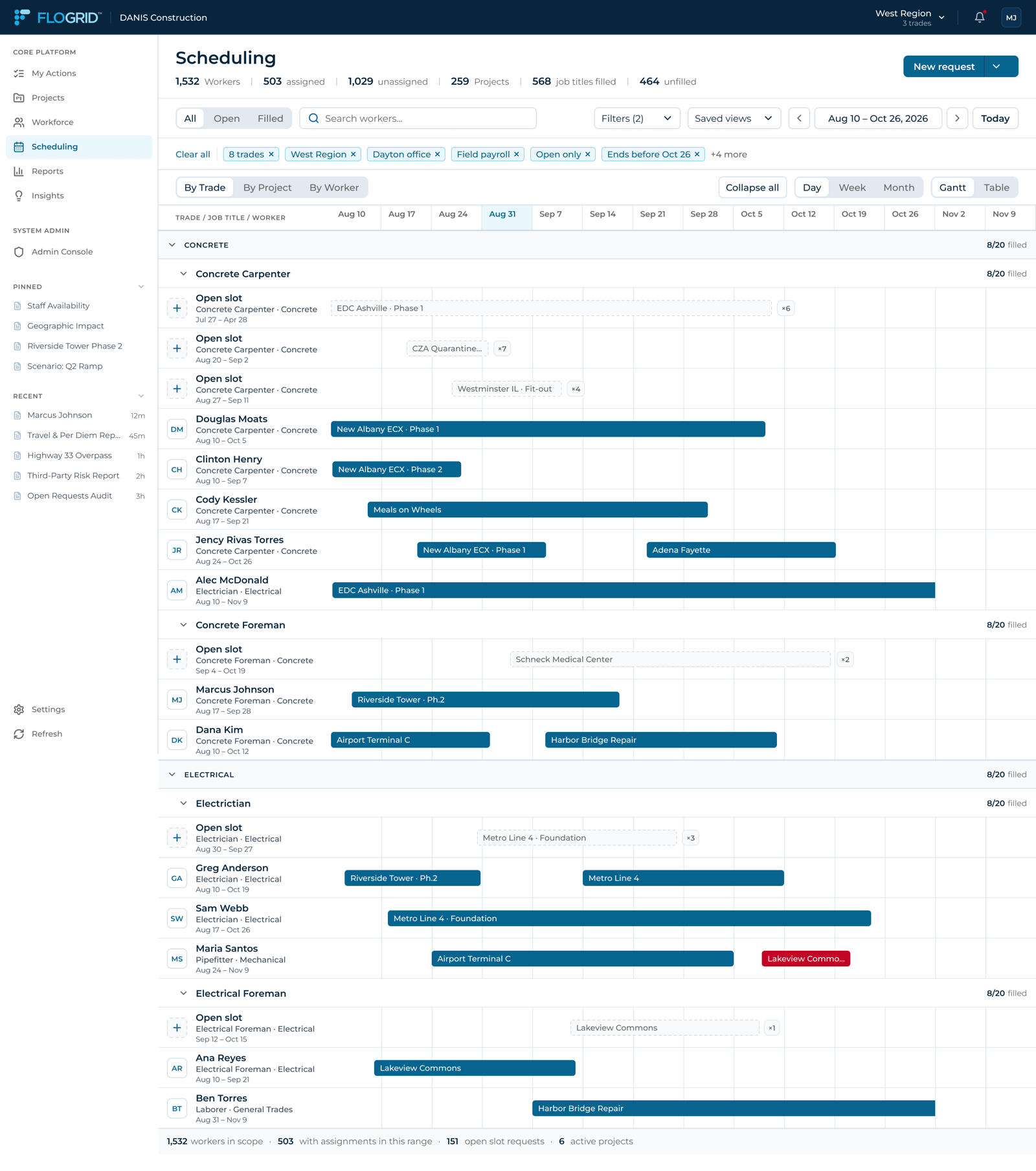
Press + on any open slot, then fill it with a worker or a saved crew. The data is made up.
Best on a larger screen. On a phone, the still is shown instead.
 DANIS ConstructionWest Region3 tradesKM
Scheduling
1,532 Workers503 assigned1,029 unassigned259 Projects568 job titles filled464 unfilled
Know which system owns the data
FloGrid didn't own most of its data. P6 owned project schedules, SharePoint owned people and access, and FloGrid kept its own database for requests and allocations. Schedule and people data came in on a scheduled sync rather than live, so a "last sync" time on screen showed how fresh it was.
Project managers could change dates inside FloGrid. The change saved right away so everyone saw it, then wrote back to P6, which stayed the source of truth. It worked in both directions, but it wasn't a true two-way sync, because P6 was always the owner.
Write down what the screens can't say
A screen shows what the product looks like. It doesn't say why amber means one thing only, when a drawer is the wrong choice, or what happens when two requests want the same worker. On a build partly written by agents, anything I left unsaid became a default, so I wrote it down in three layers:
- DESIGN.md. The tokens, the modes and the rules for how they combine.
- Design intent. What the product is for, who it serves, and the reasoning behind the calls above.
- Component specs. One per component: usage, states, sizes, and the values carried straight out of Figma.
# Design Spec: Filling a Labor Request| | || :-- | :-- || **Version** | 1.2 || **Author** | Latimer Gray, Product Design || **Status** | Ready for build || **Area** | Projects & Scheduling → Assignments |> Portfolio sample. Reconstructed from the shipped design, with names and details changed.**Abstract.** How a workforce manager fills an open labor request by assigning workers. Covers candidate matching, assigning, conflicts and partial fills. Splitting, moving and change requests have their own specs. Visual detail belongs to the design system.---## 1. User roles**Workforce manager.** Fills requests all day, usually several projects at once. Needs to see who fits and who's free without leaving the request. Accountable if a crew shows up short or someone is double-booked.**Project manager.** Requests labor for their project. Doesn't assign people, but needs to know when a request is filled and who's coming.**Worker.** The person being assigned. Needs to know where, when and for how long, with no surprises about overlapping jobs.**Executive.** Doesn't assign. Reads utilization and open demand across projects.---## 2. Objects**Labor request.** A project's need for a number of workers in one trade.| Dimension | Notes || :-- | :-- || Trade | Ironworker, Electrician, General labor... || Project & site | One per request || Dates & shift | "Jun 2 – Jun 27 · 8h/day · Mon–Fri" || Slots | Number of workers needed, e.g. 2 || Priority | P1–P4 || Requirements | Certs or skills, e.g. rigging cert || Requested by | PM name and date |**Candidate.** A worker shown as a possible fit, with a match score, distance, certs and availability: **Available**, **Partially available** or **Conflict**.**Assignment.** One worker filling one slot on one request for a date range.**Request status:** Open → Partially filled → Filled.Vocabulary: say **request**, not ticket or order. Say **assign**, not book or staff.---## 3. Behavioral rules| From | Action | Result || :-- | :-- | :-- || Open | Manager assigns an available candidate | Inline confirm in the card, then the slot is filled || Open | Manager assigns a candidate with a conflict | Inline warning; "Assign anyway" required || Partially filled | Last open slot is filled | Request becomes Filled; PM is notified || Filled | Manager unassigns a worker | Request returns to Partially filled |- Candidates are ranked by match score. Conflicts are shown, never hidden.- A conflict can be overridden. The override is flagged on **both** requests.- Confirmation happens inside the candidate card, not in a modal, so the list stays in view.### Messages| Trigger | Response | Copy || :-- | :-- | :-- || Assign, no conflict | Confirm | "Fills 1 of 2 slots · 1 will remain open" || Assign, conflict | Warn + override | "Double-books Gary for 4 days · flagged on both requests" || Partially available | Inform | "Partially available" + the overlapping dates |---## 4. Assumptions- We're assuming managers fill requests from a desktop. Field supervisors may need mobile later.- We're assuming match score is trusted enough to set the default sort. Needs validating in UAT.## 5. TBDs- **TBD:** Does the worker confirm an assignment, or is it final when the manager assigns? Depends on ops input.- **TBD:** Should high-priority requests let managers bump a worker off a lower-priority job?## 6. Design rationale- **Overrides, not hard blocks.** Real crews flex. Blocking every conflict would push managers back to spreadsheets. Flagging both requests keeps it accountable.- **Inline confirm.** Managers assign several people in a row. A modal would hide the list they're comparing.Keep the build on the system
The system had to hold in code too, and a good share of my work was there. I carried the tokens into the codebase as semantic tokens, so a component asks for what a color is for instead of which color it is. The component library lives in the repo, shared with the whole project team, and every file went to Danis in a formal handoff. To catch drift before review, I set up a GitHub check that flags pull requests whose UI doesn't match the system. Code Connect was next; we were still weighing the options.
Outcome
The project wrapped in early October, heading into go-live, and became its own product.
The last stretch was design working against the build. I audited the test environment screen by screen against the Figma files and the specs the agents built from, and we tested with the same user groups during user acceptance testing. Most findings were about drawers and correcting mistakes.
One finding changed the core of the product. The scheduling gantt was grouped by project, but workforce managers think in trades: they needed every electrician together, across projects. One view couldn't match how everyone worked, so the gantt gained a view by requested role alongside the project grouping. Where the mismatch came from my spec, I revised the spec. On a spec-driven pilot the question is also "did I write it so it could be built right."
Reflection
Plans change constantly, so I designed for adjustment instead of fixed workflows.
Most planning tools assume you make a plan and then run it. Construction doesn't work like that, and designing for constant change was the most important call on this project. What held seven areas and four kinds of user together was the system underneath: shared tokens and components, one vocabulary, and plain rules for how a change in one place shows up everywhere else.
The data side changed how I start projects. I now ask four questions early: which system owns this field, is it live or synced and how often, can people edit it here, and what do they see when the source system is down.
Designing in an AI year
The tools changed during this project. A DESIGN.md wasn't a standard artifact when we started. It is now, and it took me several versions before mine carried enough to build from.
I'll be honest about how that felt. When the build drifts from the design, it's disheartening, because I want to be proud of the work and the fix is rework. When it lands, it lands fast. Both were true, often in the same week. More than once I redesigned over work that reached testing without passing through design. There isn't a proper seat for a designer in the agent loop yet, and finding one without giving up the creative side of the work is what I'm working on now.
What I'd do differently
I'd write the rules before the first screen: what a trade is versus a category, what a privileged flag protects, how a change in the project plan shows up on the schedule. I settled those through the interface and then rewrote the specs to match. On a spec-driven project the spec is the design, so it would have been faster, and cleaner for the agents, the other way round.